
The timeframe decides the hold
An A on a high timeframe can run for days. A C is often finished inside the session. The timeframe sets both the hold and the size.
Supply and demand, called in advance, posted live to over 5,000 people. Gold, silver, crypto, FX and energy. Every entry, every stop, every exit — in the open, whether it works or not.
Price leaves footprints where big orders sat. Supply above, demand below. Gold, silver, FX, energy — all read the same way. The hard part is waiting for price to come to me.
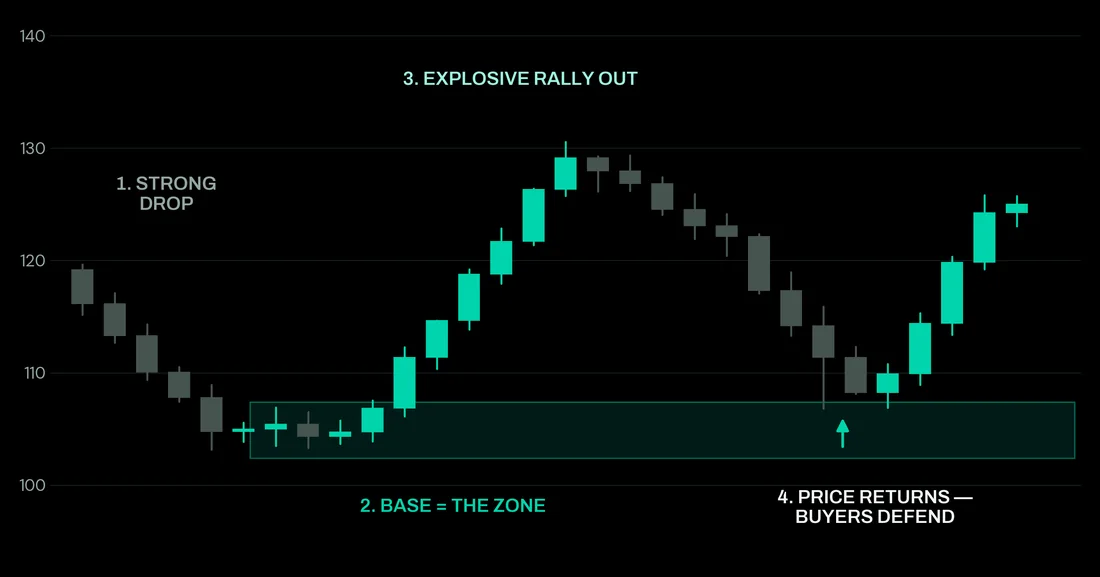
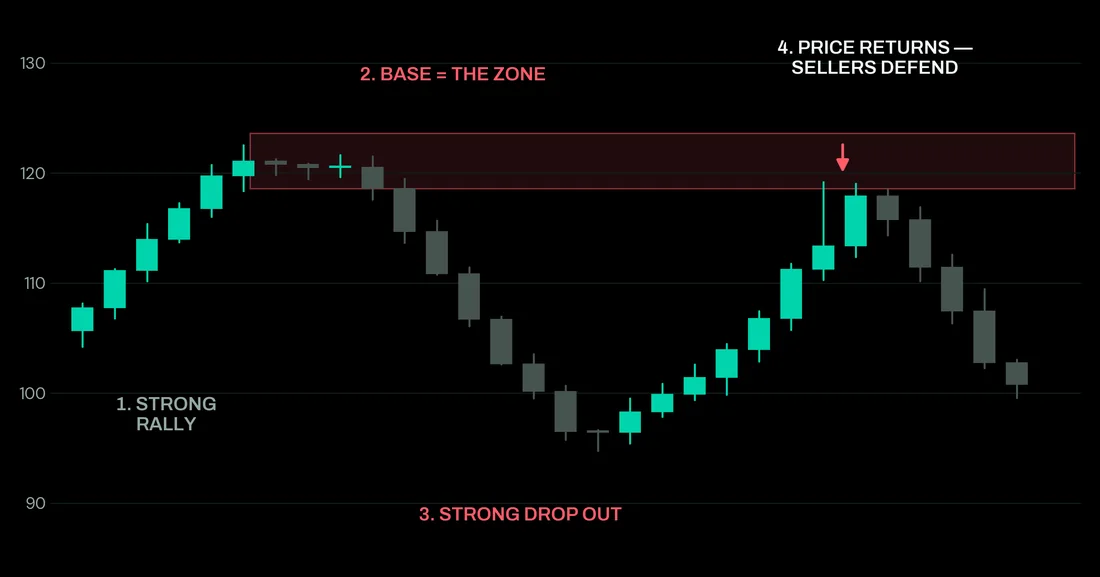
The grade is timeframe, not quality. Risk never leaves 1–3%, however good a setup looks. At 1:1 the stop moves to break-even and the rest runs.
An A on a high timeframe can run for days. A C is often finished inside the session. The timeframe sets both the hold and the size.
Gold carries most of it. Silver, bitcoin, USDCHF, USDCAD, NZDUSD and natural gas when the structure is there.
Levels go on the chart first. If price never arrives, there's no trade.
Pick the one that matches how much you want to do yourself.
It draws the zones I trade, on any chart, and pings you when price arrives. Every chart is measured on its own — and if the hit rate is below threshold, it stays silent instead of alerting you anyway.
Below threshold, alerts stay silent and the panel says so. Most tools shout on every chart. This one tells you when the numbers don't back it.
Supply above, demand below, graded A, B or C so you know which deserve size.
Your TradingView app pings when price enters a zone that cleared the bar.
Metals, majors, crypto, indices, energy. The logic is structural.
Posts pulled live from the channel. Each trade gets a result in R — one unit of risk — so a win and a loss are measured the same way whatever the account size.
These are live embeds — they show the posts as they stand in the channel right now, including any edits. Results are self-reported and not independently audited. Read the whole channel yourself →
Twelve pages on how to read a signal, what the zones are, and how to manage a trade once you're in it. Free, no email needed.
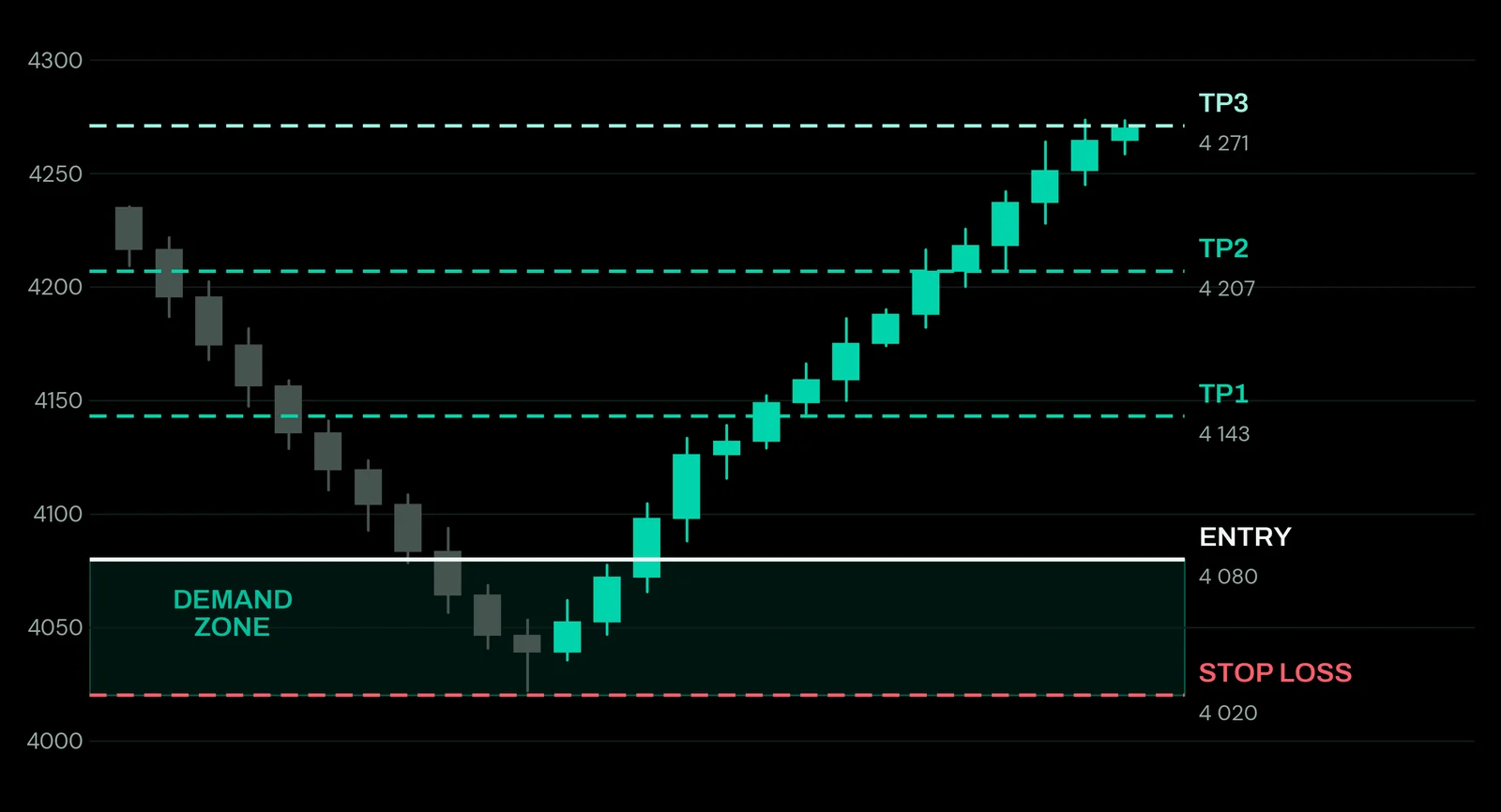
Every instrument has a different contract size, so the same stop in points is a completely different amount of money on gold than it is on silver. Put in your balance and the trade, and this works out the size.
This works out position size from the numbers you enter. It is not advice on whether to take the trade, and it cannot see your broker's actual contract specification — check the size above matches yours before you place anything.
High-impact releases move gold and the dollar in seconds and blow through stops. Red-folder events only, USD and EUR, updated live.
Calendar data is supplied by TradingView. Times shown follow your own device. A release landing mid-trade is the most common reason a stop gets hit on a setup that was otherwise fine — check it before you place anything.
Four steps. Takes about twenty minutes, most of it waiting on verification.
My setup is built around Vantage. Open the account and put my code in the referral field so I can find you and help you configure it.
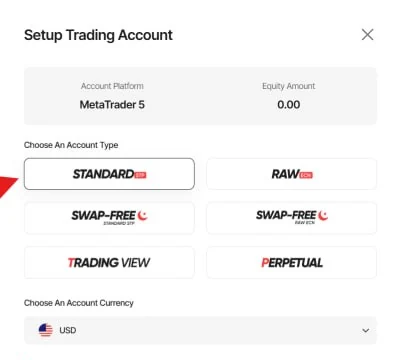
Upload your ID, wait for approval, then create a live account. Choose Standard on MetaTrader 5.
Deposit an amount that wouldn't change your life if it went to zero. Leverage cuts both ways.
Message me your user ID and which service you want. I'll get you into the right channel.
New indicators are included, not upsold.
More are in development. Each one goes straight to VIP members at no extra cost, and your price does not move.
No, but you need patience. Entry, stop and targets are decided before you're in the trade, not while you're watching it.
Timeframe, not quality. A gets 3% of the account, B 2%, C 1%. A C just sits on a smaller chart.
Enough that 2–3% of it is a meaningful position, and little enough that losing all of it changes nothing. That decides your number, not me.
The free channel tells you what I am trading and how it ended — instrument, direction, setup grade, and the result in R. VIP gets the numbers: entry, stop loss and every target, in time to place the trade.
Free channel, yes — the broker pays me a commission on referred accounts, which is why the channel costs you nothing.
VIP members pay me directly, so use any broker you like, prop firms included.
It gets posted like every other trade. If you only want to see winners, save us both the time.
No, and be careful with anyone who says otherwise. Most people trading leveraged products lose money.
What VIP gives you is structure instead of guesswork: zones marked before the move, the grading, a fixed 1–3% risk model, and every trade I take with the reasoning. The rest is whether you follow it.
No. It's what I'm doing on my own account — not tailored to your situation, and not a recommendation that you do the same.
Watch for a few days before you spend anything. That's what the free channel is for.